

/away in Claude Code
The awaywork plugin adds the /away skill to Claude Code, which sets awaywork up and writes your queue, and a pane beside the chat: what needs you, what ran, your config.
Install
/plugin marketplace add AndreaProvenzale/awaywork
/plugin install awaywork@awaywork
/away- On Claude Code 2.1.275 or later,
/plugin install awaywork --marketplace AndreaProvenzale/awayworkdoes the first two. - Third-party marketplaces don't auto-update: run
/plugin marketplace update awaywork, or turn auto-update on under/plugin> Marketplaces. - From your shell,
awaywork initdoes it all: see Getting started.
Set up
With no config, /away sets awaywork up with you, and writes the config only on your yes. It puts it where awaywork config path says; with AWAYWORK_REMOTE set that's the server's, so there's nothing to set up.
First it looks around, without asking: awaywork doctor --json (agent CLIs, gh login), your gh accounts and their orgs, the login in each Claude Code folder, whether a job is already scheduled here, and the folders your Claude Code and Codex sessions used in the last 30 days, mapped to repos by git remote (metadata and config only).
The rounds
Then come rounds of up to four multiple-choice questions, its pick first, or type your own answer. The first round, renamed:
←  ☐ Work  ☐ Claude login  ☐ Runs on  ✔ Submit  →

Whose GitHub work should this awaywork config take care of?

❯ 1. octocat (Recommended)
     Reaches octocat, widgets; ~215 sessions in these repos, mostly api (124) and site (41).
  2. octocat-acme
     Reaches acme; ~125 sessions across acme/app, acme/backend, acme/web and others.
  [...]
One config covers one account's work; another account gets its own setup later. The round also asks which Claude login runs it and where: this machine, GitHub Actions or a box with Docker. The next rounds:
| Round | Asks |
|---|---|
| Repos | which, from your sessions; an ssh alias (git@github-work:widgets/art) waits for you to name its repo, Bitbucket Cloud is left out |
| Tracker | which one, an MCP server for it being a hint; Jira also needs your Cloud site, email and token kind |
| Window | when it runs, 01:00–07:00 your time by default |
| Providers | which goes first, if several are ready; the next takes over when its quota runs out |
| Your PRs | fix red checks or review threads, as draft PRs stacked on yours; keeping them up to date with main is a widening |
| Review requests | a report only you read, or your pending GitHub review (a widening) |
| Tracker cards | fix QA notes, implement in-progress cards, plan the sprint, and how plans wait for you |
| Proof | how a change is proven in each repo, from its own scripts; writes your proving skill on an answer |
| Learn | whether to suggest more rules from your sessions |
A widening, anything that lets awaywork write more than a draft PR or a report only you read, is always its own option. Without a question tool, each round is one numbered message, answered in your own words.
Tokens
Tokens never go through the chat. You run awaywork secret LINEAR_API_KEY (in Claude Code, ! pbpaste | awaywork secret LINEAR_API_KEY after copying it), which saves it to ~/.config/awaywork/env. The skill then reads your teams and statuses and asks only which repo each team's code is in.
The draft
Once repos and a window are picked, awaywork init --yes writes config.draft.yml beside the config, and the skill fills it in as you watch on the Config tab: repos, tracker, the rules you picked with real status names, and the gh account and Claude login where a scheduled job wouldn't find them (Which login).
It shows what each rule takes now and the closest misses, since taking nothing today doesn't make a rule wrong. On your yes the draft becomes the config and doctor runs once:
Rules (none takes anything today)
1. fix: your PRs with failing checks.
2. fix: your PRs with unresolved threads.
3. fix: your awaywork PRs with threads you started.
4. review: PRs where your review is requested, trusted authors.
5. implement: Linear NIG issues in In Progress.
6. plan: Linear NIG issues in Todo.

Commands for you to run (I never run these):
[...]
A default rule that doesn't fit, like QA on a team with no QA status, is left out with the reason.
The pane
With a config, bare /away opens the pane, read from awaywork report --json:
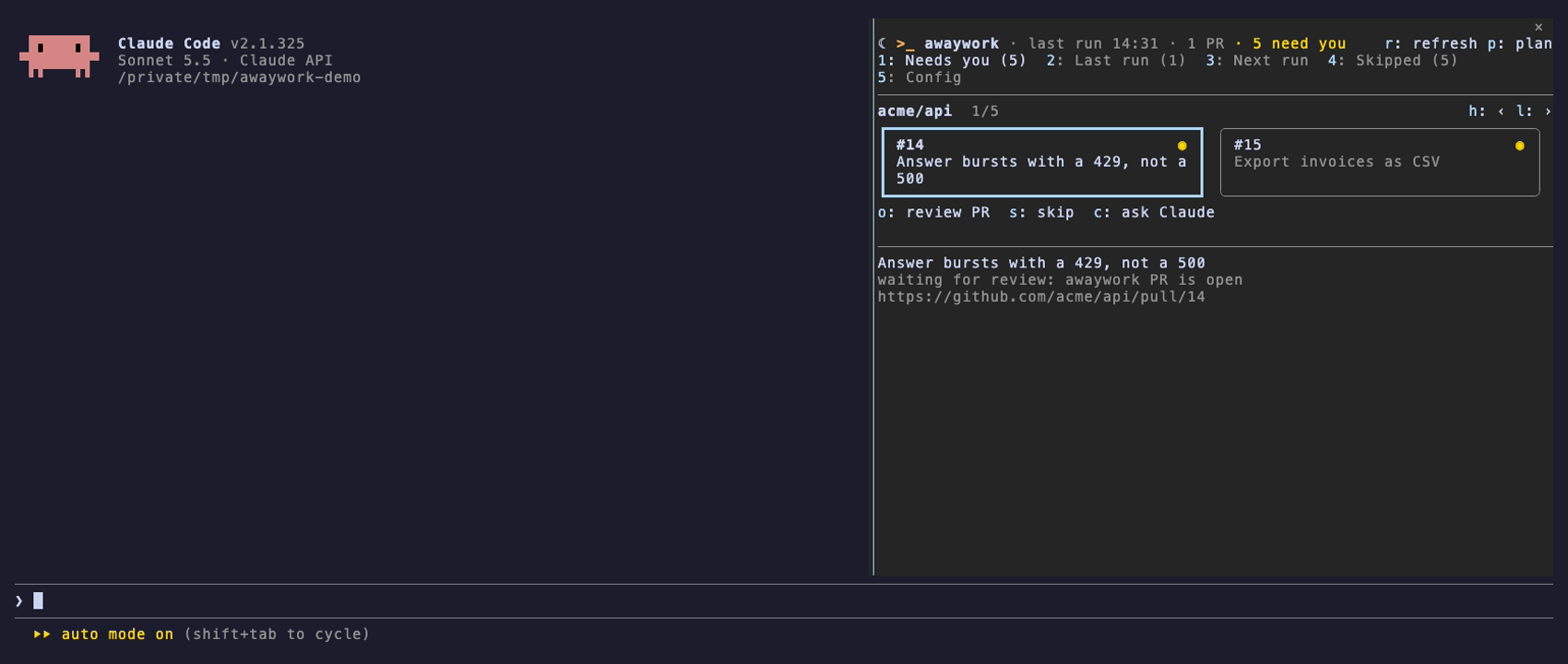
It opens on the first tab with something in it. Next run stays empty until you press p: awaywork plan probes your quota (one Haiku call) and reads your forge.
Cards
Each tab is a strip of cards under their repo or tracker project, with the card's buttons below and its detail under them: title, reason, link.
- A Needs you card shows what it asks:
◉review,?answer,◆approve,⚑stuck,✓close a finished card. A repo's cards sort by it. - A Last run card starts with how it ended (
✓,✗,■stopped), the skill on the right. - Elsewhere a card says why the item waits (
no rule,over cap,skipped by you, ...).
Keys
| Key | Does |
|---|---|
1–5 | switch tab |
r | reread the last run; on Config, what each rule takes |
p | plan the next run |
h l | previous, next card |
o | open the PR, issue or tracker item |
s | skip the item in the coming runs, or unskip it |
a | approve the plan or result it waits on, replying approve there |
g | run it now: awaywork run --unit <source:key> --detach |
v | view its report: awaywork report <run> --unit <id> |
c | ask Claude: put the card in the prompt box |
y n | answer what s, a or g asked |
b | back, from a report or the skill list |
A card shows only its own buttons.
s,aandgask first, saying what they'll do and how to undo it:skip #101 in the coming runs? awaywork unskip undoes it. Cards are what the last run orpsaw; the nextpshows the change.gis the only way the pane starts a run, on Next run's cards and on items only the schedule holds back (unchanged,skipped by you,over cap,gave up). On ano rulecard it lists skills first:gagain takes the first, a digit another.csends nothing: it typesAbout awaywork item github:acme/shop#7 "Retry webhooks on 5xx" (waiting for review):and leaves the rest to you.
The pane has the keyboard when it opens. Click a card and the strip takes every key (arrows, Tab, letters) until Esc hands it back to the prompt; that's how the desktop app gets keys at all. In VS Code, click a card's ref to pick it.
The Config tab
Tab 5 is your config as it reads to a human: the draft while there is one, else the file. With no config yet or a draft waiting, the pane opens here.
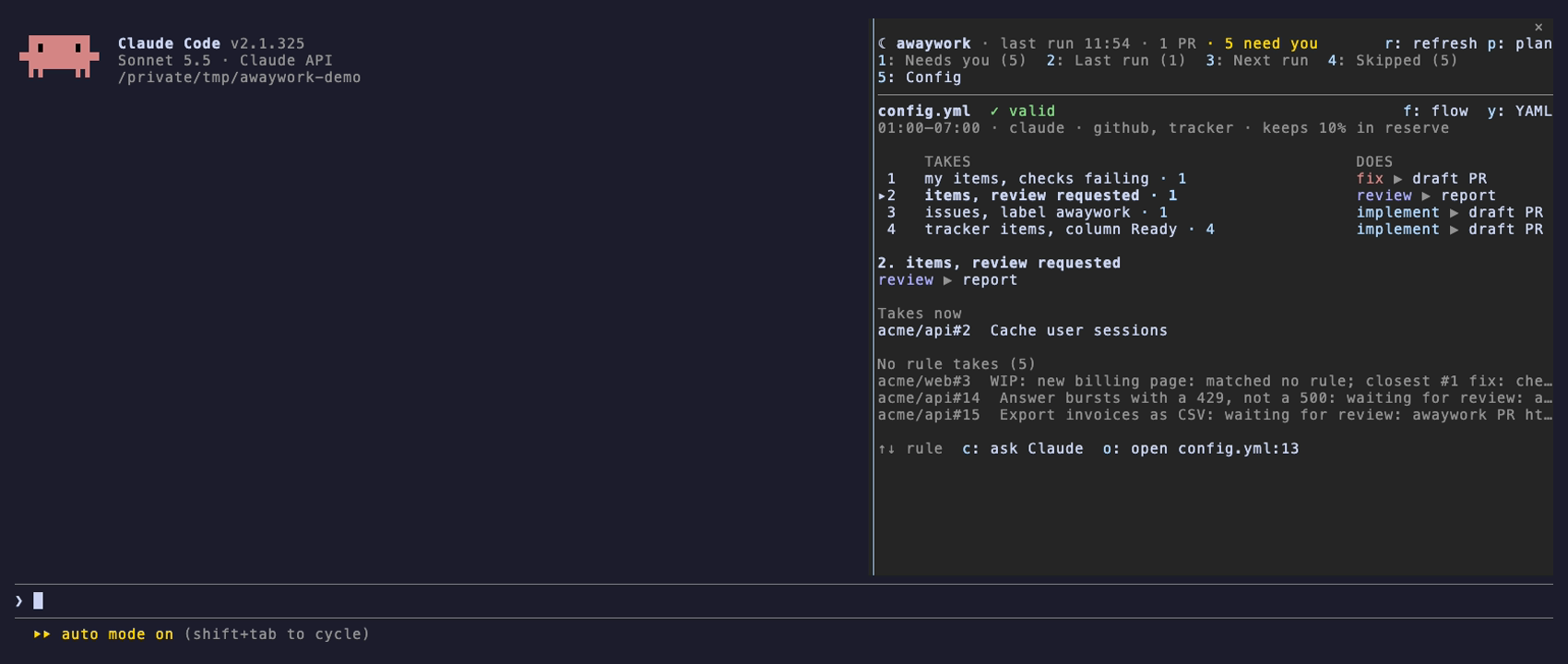
One row per rule: what it takes, how many items now (· 1, from plan --rules, no quota), and what it does. The selected rule lists those items, the ones an earlier rule takes first, and those no rule takes. ◆ marks a rule that can stop for you: a plan that waits, wait: true, or a gate.
| Key | Does |
|---|---|
| ↑ ↓ | move between rules; j k in the desktop app |
f y d | the flow, the YAML, or the last write's diff |
c | ask Claude about the rule |
o | open the rule at its line in VS Code |
The plugin watches the config's folder, so the chat's writes show at once. A draft that doesn't validate keeps the last good drawing, its problems on top. A config behind AWAYWORK_REMOTE isn't on this machine, so it gets no tab.
The skill
/away with anything after it goes to the skill (/awaywork:away too, when another command has the name). Ask in your own words: /away fix my PRs when CI goes red, /away why didn't acme/api#12 run last night?. It:
- reads your config and real names from
awaywork sources --json, so a section is spelled as Asana spells it; - drafts rules on a copy and checks them with
awaywork plan --rules --json: what each takes, what another rule takes first, and near misses; - on your yes writes them, keeping your comments and layout, and runs
awaywork doctor --json; - starts a tweak from the item (
awaywork plan --why <key>) and shows before and after; - writes your repo's proving skill with you:
/away show me it works before I review.
It never sees a token, starts a run or installs a schedule (it gives you the commands), or skips, unskips and approves without asking. Nothing reaches your config without your yes, and a widening you didn't ask for (deliver: push, deliver: pr, on_done, dropping trusted) gets its own question.
Not sure what to hand over? /away what could you take off my plate? reads your recent sessions and PRs, with your say-so each time, and proposes rules, routines and AGENTS.md lines for work you do by reflex: Suggested rules.